Plan the complete truck movement
Add loading, unloading and intermediate points together with the truck base when empty positioning should be included.

Estimate a road freight price for a European truck movement using the actual route, loaded and empty kilometres, country rates, fleet settings, tolls, driver time and commercial margin. Build the transport before you quote it.
A useful road freight calculation starts with the movement the truck will actually perform. Loaded distance alone can hide deadhead, country-cost differences and route-specific charges.
Add loading, unloading and intermediate points together with the truck base when empty positioning should be included.
Apply country rates, fleet assumptions, tolls, driver time and route-specific expenses to the complete planned movement.
Keep the internal cost visible, apply your commercial uplift and use the result as the basis for a customer quotation.
Customer freight price = complete internal route cost + commercial uplift
The same origin and destination can produce different selling prices depending on the truck movement, route countries, cargo requirements and cost model.
Use the complete truck movement instead of pricing only the customer-loaded leg.
Apply different kilometre rates to country segments when operating costs vary across the European route.
Keep the quotation connected to the fleet profile selected for the transport calculation.
Include estimated road charges and add known ferry, tunnel or route-specific expenses separately.
Use the complete distance to estimate driving time, breaks, daily rests and time-related operating cost.
Apply a clear commercial uplift after the internal route cost has been calculated.
Assume the truck runs 90 km empty to collection and 720 km loaded to delivery. Route cost, tolls and time-related expenses are calculated before a 12 percent commercial uplift is applied.
The example demonstrates the difference between what the movement costs internally and what is quoted to the customer.
| Freight pricing component | Example amount |
|---|---|
| Loaded and empty distance cost | €905.00 |
| Estimated tolls | €135.00 |
| Time and fixed expenses | €110.00 |
| Internal route cost | €1,150.00 |
| Commercial uplift (12%) | €138.00 |
| Estimated road freight price | €1,288.00 |
Illustrative example only. It is not a binding carrier quotation or a market-rate guarantee.
Include the vehicle movement required to reach the load instead of silently absorbing empty kilometres.
Use actual route countries and your own operating assumptions instead of one generic kilometre price.
See whether the proposed selling price remains above the internal route cost before sending it to the customer.
Retain a clear breakdown of the route assumptions behind the final road freight price.
A road freight price can be built from the complete truck movement, country-specific distance cost, tolls, driver and time cost, fixed expenses and a commercial uplift.
Yes. A truck base can be added so empty positioning to the first loading point remains visible in the transport calculation.
No. LogicCalc calculates a planning price from your route and configured cost assumptions; it does not claim to provide a guaranteed live carrier market rate.
Yes. Estimated tolls can remain visible separately and can be included in the final customer price when that matches your pricing model.
This is a real LogicCalc workspace view. Use your own route, cargo, fleet and commercial settings for the actual calculation.
Open LogicCalc →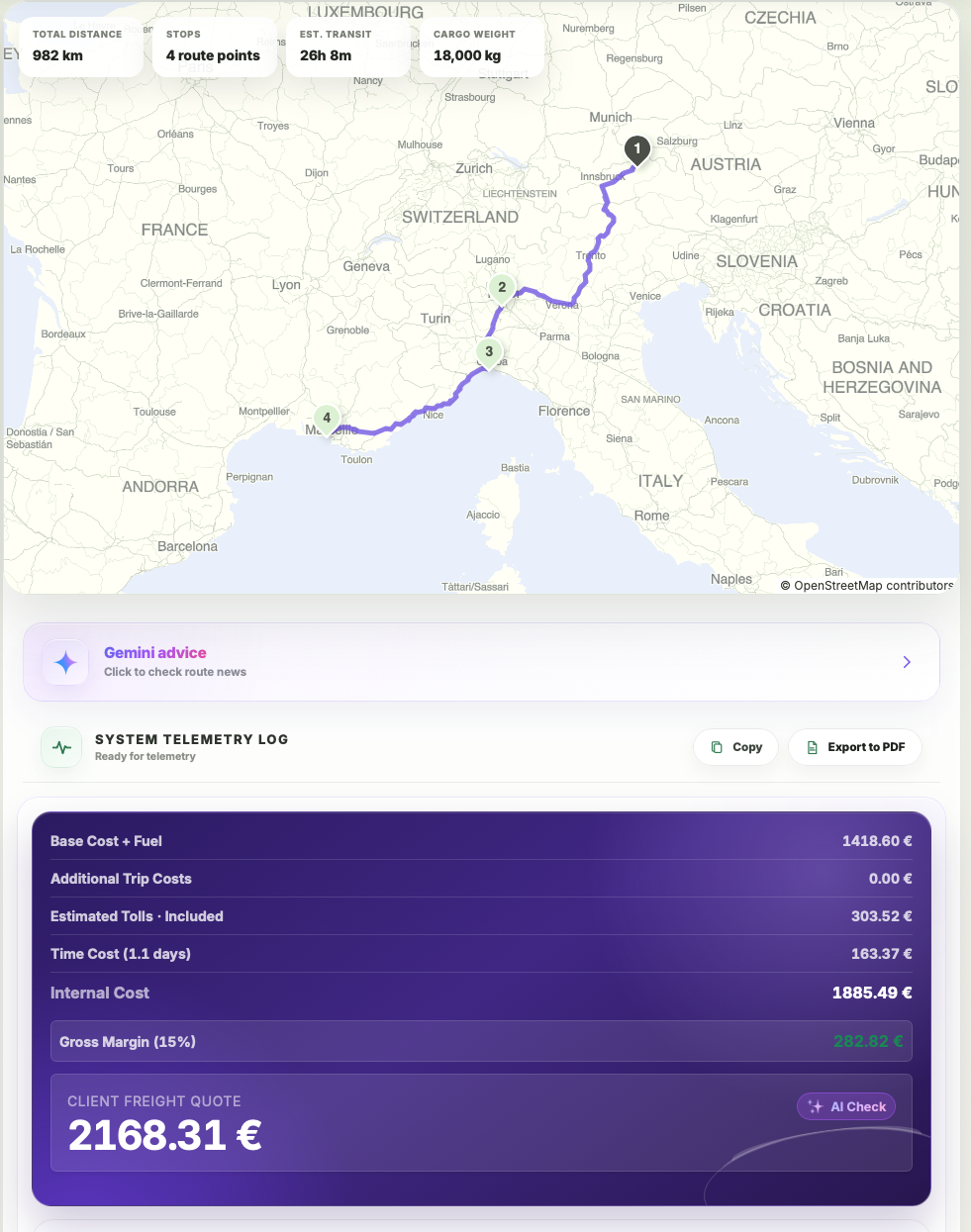
A profitable quotation starts with a complete internal route cost. The commercial uplift is then added to cost, while the resulting gross margin is measured against the final selling price.
Complete the route, country rates, tolls, driver time and fixed expenses before applying any commercial uplift.
Apply a percentage uplift or enter the intended selling price, depending on the company quotation process.
Compare profit amount, markup and margin so the price is not accepted with a misunderstood percentage.
Profit = selling price − cost; markup = profit ÷ cost × 100; margin = profit ÷ selling price × 100
Assume the completed internal route cost is €1,000. Applying a 15% markup on cost adds €150 and produces a customer price of €1,150.
The gross margin is not 15%. Because margin is measured against the selling price, the same quotation produces a margin of approximately 13.04%.
| Pricing value | Example result |
|---|---|
| Internal transport cost | €1,000.00 |
| Markup on cost | 15.00% |
| Gross profit amount | €150.00 |
| Customer price | €1,150.00 |
| Gross margin on price | 13.04% |
This is a simplified gross calculation before taxes, commissions, claims, financing costs and other company overheads.
Markup measures profit against cost, while margin measures profit against selling price. The percentages are therefore different for the same quotation.
Multiply the internal cost by one plus the markup percentage. For example, €1,000 with a 15% markup becomes €1,150.
Divide cost by one minus the target margin expressed as a decimal. A 15% target margin on €1,000 requires a selling price of about €1,176.47.
Include every expense that the company intends to recover through the quoted price. Otherwise the apparent margin can be higher than the real result.
A useful rate-per-kilometre figure must use the complete route distance and complete trip economics. Ignoring deadhead, tolls or time cost can make an apparently profitable rate fall below break-even.
Include empty positioning and every loading, unloading and intermediate leg so the denominator reflects the truck movement being priced.
Add distance-based cost, fuel surcharge, tolls, fixed expenses, driver salary and vehicle time cost.
Use €/km for analysis while still quoting and exporting the full client freight price.
Client rate per kilometre = Client freight price ÷ Complete planned distance; Profit per kilometre = Client rate per kilometre − (Internal transport cost ÷ Complete planned distance)
The final €/km result is only as reliable as the cost and distance underneath it. Use the whole route and include the expenses that the vehicle actually creates.
Use loaded, intermediate and empty positioning kilometres rather than only invoiceable loaded distance.
Distance segments can use different configured rates depending on the country crossed.
A percentage-based fuel adjustment changes the internal cost and therefore the break-even rate.
Road charges, ferries and route-specific costs must be recovered by the selling rate.
Long transit time can increase cost even when the physical route distance does not change.
The selected margin turns the internal break-even cost into the final customer price.
Divide the relevant transport amount by the complete planned route distance. Use internal cost for break-even €/km and client price for selling €/km.
For internal profitability, total truck movement is usually the safer denominator because empty positioning also creates cost. Commercial contracts may use a different convention.
Tolls increase internal trip cost. When the same distance remains unchanged, the break-even and required client rates per kilometre increase.
No. Country rates are inputs used to calculate distance-based cost. The final client rate also reflects fuel, tolls, time costs, fixed expenses and margin.
LogicCalc keeps full route totals in the calculation and saved route workflow. Divide comparable totals by complete distance using the same cost assumptions.
Divide the relevant transport amount by the complete planned route distance. Use internal cost for break-even €/km and client price for selling €/km.
| Rate component | Example result |
|---|---|
| Complete planned distance | 920 km |
| Internal transport cost | €1,196.00 |
| Break-even cost per kilometre | €1.30/km |
| Commercial margin | 15% |
| Client freight price | €1,407.06 |
| Client rate per kilometre | €1.53/km |
Rounded values are used for readability. Calculate commercial decisions from the unrounded totals in the active LogicCalc route.
Turn the economics of one calculated trip into a customer price without losing sight of the internal cost. Route cost, tolls and fixed trip charges stay visible before a target margin is applied.
Use the quote calculator when the route is already known and the decision is commercial: what should this specific transport be offered for?
Start with the calculated route and its internal cost components. Keep distance-based cost, tolls and any fixed trip charges on the cost side before you think about the sell price.
Apply the intended surcharge or target margin to the trip economics rather than guessing a round figure. The quote should make the gap between cost and client price explicit.
Check the proposed customer price against the underlying trip cost. A quote that looks attractive in isolation can still be weak if tolls, fixed charges or route changes have moved the cost base.
Start from route costs, add tolls and other fixed charges, then apply the desired margin. LogicCalc keeps internal economics and the client price in the same route calculation.
Before sending a price, verify that the route and all material cost inputs still match the job you are actually quoting.
No. Internal cost is the estimated cost of performing the trip; the client price is the commercial amount offered after the relevant additions and margin logic.
Use the cost items that actually belong to the trip: route-based operating cost, tolls and any relevant fixed or manual charges. Missing a material cost makes the margin look better than it really is.
Cost per kilometre builds an internal unit-cost baseline for the truck. The quote calculator applies trip-specific distance, tolls and charges to a real route and turns that trip economics into a customer price.
No. It is a planning result based on the inputs and settings available at calculation time. Unexpected waiting, rerouting, extra services or incorrect cost assumptions can change the final result.
LogicCalc applies the configured fuel surcharge percentage to the base distance-based route calculation. The fuel amount remains separate so you can see exactly how it changes the transport total.
Build the full route, including optional empty positioning, and calculate each country segment using the configured kilometre rates.
Set the percentage used by your company or contract. LogicCalc calculates the fuel adjustment from the base route cost.
Add tolls, time cost and fixed expenses, then review internal cost, margin and the final client freight quote.
Fuel surcharge amount = base route cost × fuel surcharge percentage ÷ 100
The percentage is only one part of the result. The route, kilometre rates and whether empty positioning is included determine the base amount to which the fuel surcharge is applied.
The distance-based cost is calculated before the fuel adjustment is added.
Use the current percentage agreed with the customer, carrier or internal pricing policy.
Longer routes and additional stops increase the distance-based amount used as the surcharge base.
A positioning run from the truck base to the first loading point can be included in the base calculation.
Tolls, ferries, driver time and fixed expenses are shown separately from the percentage-based fuel surcharge.
After internal route costs are assembled, a commercial margin can be applied to calculate the client price.
Assume the distance-based route cost is €1,100.00 and the configured fuel surcharge is 12.5%. The surcharge amount is calculated directly from the base route cost.
Tolls and other route expenses are then added to the fuel-adjusted total. In this simplified example, a 15% commercial margin is applied to the internal cost.
| Calculation component | Example amount |
|---|---|
| Base route cost | €1,100.00 |
| Fuel surcharge (12.5%) | €137.50 |
| Base cost plus fuel surcharge | €1,237.50 |
| Tolls and fixed expenses | €180.00 |
| Internal transport cost | €1,417.50 |
| Commercial margin (15%) | €212.63 |
| Estimated client price | €1,630.13 |
Illustrative example only. Use the percentage and commercial rules that apply to the actual transport order.
A fuel surcharge is an additional amount intended to reflect fuel-price pressure. In LogicCalc it is entered as a percentage and calculated from the base distance-based route cost.
LogicCalc multiplies the base route cost by the entered fuel surcharge percentage and divides the result by 100.
In the current LogicCalc calculation, the percentage-based fuel surcharge is calculated from the base route cost. Tolls, time-related costs and fixed expenses are added separately.
Yes, when a deadhead route is calculated from the truck base to the first loading point, its distance-based cost becomes part of the base route calculation.
Use the percentage agreed in the transport contract or required by your company pricing policy. LogicCalc does not determine an official market percentage.
Yes. The calculation can be combined with other costs and commercial margin and included in a client-ready route summary.
Explore route planning, transport pricing, cargo, driver-time and sustainability tools in one connected workspace.
Build the complete truck movement, review internal route cost and apply the commercial margin only after the operating assumptions are visible.
Road freight results are planning estimates. Verify route restrictions, toll tariffs, vehicle suitability, carrier availability, legal requirements and current commercial conditions before confirming a transport order.